A year of Node.js

Today marks one year exactly since switching my website from Perl to Javascript/Node.js! I posted back in March about having made the switch, but at that point my “production” website was still running on Perl. I switched over full-time to Node.js shortly after that post.

From the very first commit to the latest one:

$ git diff --stat 030430d 6b7c737
[...]
177 files changed, 11313 insertions(+), 2110 deletions(-)

Looking back on it, I’ve learnt a hell of a lot in that one single year! I have—

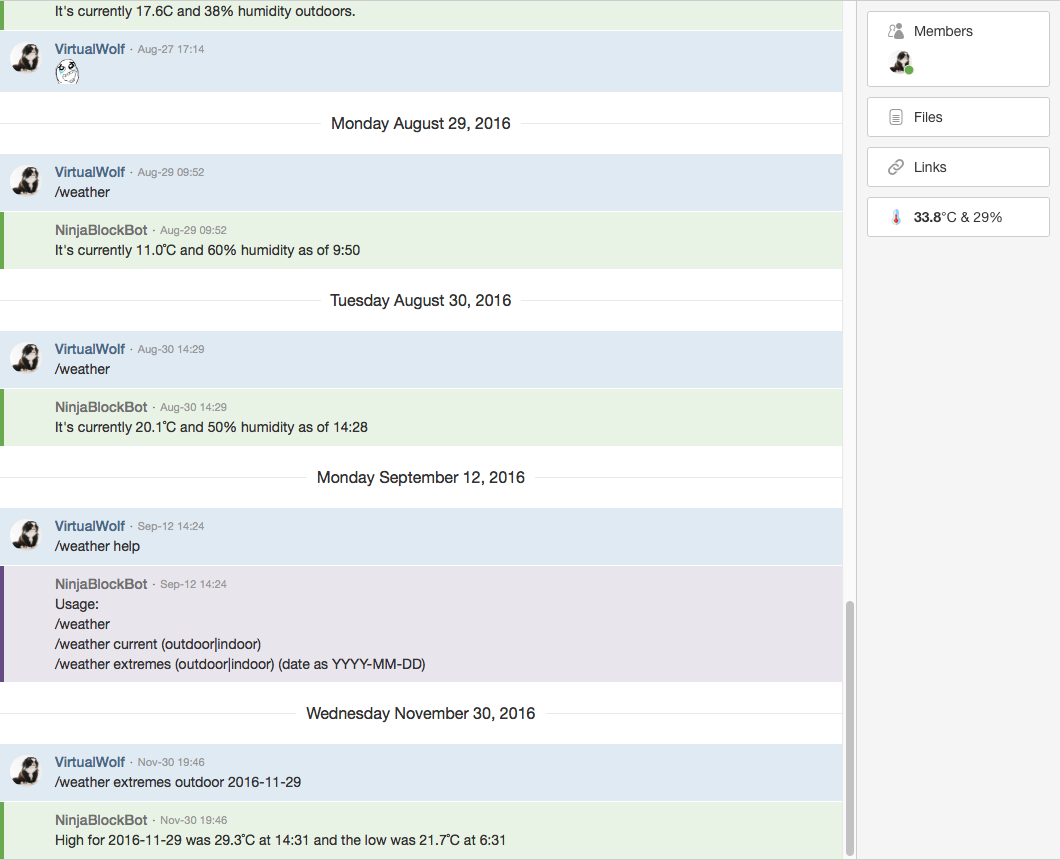
  • Written a HipChat add-on that hooks into my Ninja Block data (note the temperature in the right-hand column as well as the slash-commands; the button in the right-hand column can be clicked on to view the indoor and outdoor temperatures and the extremes for the day)
  • Refactored almost all of the code into a significantly more functional style, which has the bonus of making it a hell of a lot easier to read
  • Moved from callbacks to Promises, which also massively simplified things (see the progression of part of my Flickr– and HipChat-related code)
  • Completely overhauled my database schema to accomodate the day I eventually replace my Ninja Block with my Raspberry Pi (the Ninja Block is still running though, so I needed to have a “translation layer” to take the data in the format that the Ninja Block sends and converts it to what can be inserted in the new database structure)
  • Added secure, signed, HTTP-only cookies when changing site settings
  • Included functionality to replace my old Twitter image hosting script, and also added a nice front-end to it to browse through old images
Along with all that, I’ve been reading a lot of software engineering books, which have helped a great deal with the refactoring I mentioned above (there was a lot of “Oh god, this code is actually quite awful” after going through with a fresh eye having read some of these books)—Clean Code by Robert C. Martin, Code Complete by Steve McConnell, The Art of Readable Code by Dustin Boswell and Trevor Foucher.

I have a nice backlog in JIRA of new things I want to do in future, so I’m very interested to revisit this in another year and see what’s changed!

Farewell Dreamhost

After 12 years of service, I’m shutting my Dreamhost account down (for those unaware, Dreamhost is a website and email hosting service).

My very first—extremely shitty—websites were hosted on whichever ISP we happened to be using at the time—Spin.net.au, Ozemail, Optus—with an extremely professional-looking URL along the lines of domain.com.au/~username. I registered virtualwolf.org at some point around 2001-2002 and had it hosted for free on a friend’s server for a few years, but in 2005 he shut it down so I had to go find some proper hosting, and that hosting was Dreamhost.

The biggest thing I found useful as I was dabbling in programming was that Dreamhost offered PHP and MySQL, so I was able to create dynamic sites rather than just static HTML. Of course, looking back at the code now is horrifying, especially the amount of SQL injection vulnerabilities I had peppered my sites with.

Around the start of 2011, I started using source control—Subversion initially—and finally had a proper historical record of my code. I used PHP for the first year or so of it, then ended up outgrowing that and switched to a Perl web framework called Mojolicious. The only option to run a long-lived process on Dreamhost is to use Fast-CGI, which I never managed to get working with Mojolicious, but fortunately Mojolicious could also run as a regular CGI script so I was still able to use it with Dreamhost, albeit not at great speed.

At the same time I started using Subversion, I also signed up with Linode who offer an entire Linux virtual machine with which you can do almost anything you’d like as you have full root access. I originally used it mostly to run JIRA so I could keep track of what I wanted to do with my website and have the nifty Subversion/JIRA integration working to see my commits against each JIRA issue. I slowly started using the Linode for more and more things (and switched to Git instead of Subversion as well), until in 2014 I moved my entire website hosting over to the Linode.

At that point the only thing I was using Dreamhost for was hosting Kristina’s website and WordPress blog, and the email for our respective domains. Dreamhost’s email hosting wasn’t always the most reliable and towards the end of 2015 they had more than their usual share of problems, so we started looking for alternatives. Kristina ended up moving to Gmail and I went with Fastmail (who I am extremely happy with and would very highly recommend!), I moved her blog and my previously-LiveJournal-but-now-Wordpress-blog over to the Linode, and that was that!

Moving my website hosting to the Linode also allowed me to move over to Node.js and I’ve been going full steam ahead ever since. Since that posted I’ve moved over from callbacks to Promises (so much nicer), I wrote myself a HipChat add-on to keep an eye on the temperature that my Ninja Block is reporting, and I moved my dodgy Twitter image upload Perl script functionality into my site and added a nice front-end to it. Even looking back at my code from 6 months ago to now shows a marked increase in quality and readability.

So in summary, thanks for everything Dreamhost, but I outgrew you. 🙂

Stubbing services in other services with Sails.js

With all my Javascript learnings going on, I’ve also been learning about testing it. Most of my website consists of pulling in data from other places—Flickr, Tumblr, Last.fm, and my Ninja Block—and doing something with it, and when testing I don’t want to be making actual HTTP calls to each service (for one thing, Last.fm has a rate limit and it’s very easy to run into that when running a bunch of tests in quick succession which then causes your tests to all fail).

When someone looks at a page containing (say) my photos, the flow looks like this:

Request for page → PhotosController → PhotosService → jsonService → pull data from Flickr’s API

PhotosController is just a very thin wrapper that then talks to the PhotoService which is what calls jsonService to actually fetch the data from Flickr and then subsequently formats it all and sends it back to the controller, to go back to the browser. PhotosService is what needs the most tests due to it doing the most, but as mentioned above I don’t want it to actually make HTTP requests via jsonService. I read a bunch of stuff about mocks and stubs and a Javascript module called Sinon, such but didn’t find one single place that clearly explained how to get all this going when using Sails.js. I figured I’d write up what I did here, both for my future reference and for anyone else who runs into the same problem! This uses Mocha for running the tests and Chai for assertions, plus Sinon for stubbing.

Continue reading “Stubbing services in other services with Sails.js”

Learning new things: Javascript and Node.js

We’ve used Node.js (specifically with a framework called Sails.js) at work for a number of projects but I never really felt I properly understood one of Node’s fundamental concepts, that of the callback. It’s absolutely pervasive throughout Node and I was able to muddle on through at work without totally grasping it, but it wasn’t ideal.

Back at the end of January I decided to try rewriting my website using Node.js (it’s currently written in Perl using the Mojolicious framework) as a learning experience. It’s now almost two months later and my site is actually completely rewritten with Node/Sails (sans tests, which are currently being written; I know about test-driven development but I wasn’t about to start bashing my head against failing to understand how to get the tests to do what I wanted on top of learning a whole new language :P) with all the same functionality of my Perl one, and although I’m still far from an expert I actually feel like I have a proper handle on what’s going on.

The problem I found when trying to find examples was that they were all very contrived; I felt like they were missing fundamental underlying parts that apparently everybody else was able to understand but I couldn’t. For me, the “ah ha” moment was this post on Stack Overflow about using callbacks in your own functions. It didn’t assume anything or use an example of some module that apparently everyone is already familiar with (the most common one was fs.read() to read data from the filesystem). Once I had that straight, it was full steam ahead. It’s also significantly easier to deal with Javascript objects compared to Perl’s array/hash references.

My actual live website at virtualwolf.org is still on the old Perl version, but I don’t want to put the Node one up until I’ve actually got it properly covered with tests. Speaking of tests, I’m using a thing called Istanbul for code coverage, the reports it generates look like this, and it’s really satisfying having the numbers and bars go up as your coverage increases. It’s basically gamification of tests, really!

All in all, I’m pretty pleased!

Introducing the LiveJournal XML Importer

Continuing on from my previous post about my LiveJournal to WordPress experience, and how the importer managed to miss a bunch of entries, it turns out I didn’t have every notification email still around. The ones prior to February of 2004 I’d apparently deleted so sadly there’s no recovering Kristina’s really early comments from the missing posts, but from what I could see there weren’t too many of those anyway, thankfully.

However, I’m happy to say that I’ve been able to hack the importer to import all the entries and comments from an ljdump archive! I’ve put the code up on Codeberg, I’m sure there’s bugs and edge-cases and things that don’t work properly, but it worked perfectly for me. I’ve changed it from the original importer to still import comments from journals that have been deleted so the threading remains intact and you don’t end up with weird comments seemingly replying to nothing. They’re easily identified by the fact that the date on the comment is set to the time you performed the import, so they show up at the top of the Comments section in WordPress’ admin.